your buyer has a second question
Answer the Buyer’s Next Question
Ads you can chat with, AI brand summaries, and a page update you can make this week.

Hey humans!
“Who should I hire?” gets you onto a shortlist.
“What does it cost, what is included, and how long will it take?” decides whether the buyer keeps going.
This week’s changes in AI shopping make those follow-up questions worth paying attention to. You can start answering them on the page you already own.
Today’s Mini-Playbook
(5 min read)
Quickies:
- YouTube is bringing conversations into product comparisons.
- Google is showing AI summaries for more major brands.
🛠️ This Week’s AI Arsenal :
- Autonoma
📋 Mini-Playbook: Answer the Buyer’s Next Question
[FOR YOUR TEAM] Share this with your marketing lead and the person handling sales calls. Choose one service page and gather the questions buyers usually ask before making a purchase.

⚡ QUICKIES
➡️ YouTube wants to answer the shopping follow-up
YouTube is making product research more interactive. Its Ask YouTube feature is bringing together product reviews and recommendations, including comparison tables. Viewers can ask follow-up questions directly on the watch page or use voice controls on TV.
This creates an opportunity for your next product demo. Go beyond the headline and cover the questions buyers are likely to have: Will it work with what I already own? What are its limitations? How difficult is the setup? What makes one option different from another?
➡️ Your brand name can trigger an AI Overview
A small test involving around 100 major brands found that Google showed AI Overviews for 93% of them, often below the brand’s own search result. That’s what happened in this particular sample, not a figure that applies to every business.
Try searching for your own brand. Look at how Google describes your business, which services it mentions, and the sources it uses. If something seems inaccurate, save the details and identify which public page could help correct it.

Make your service page clearer
If your service page leaves buyers guessing what they would pay for, the Service Page SEO Sprint helps you turn it into a practical page brief. Seven lessons, about two hours, $27 once.
Explore the Service Page SEO Sprint >>> Scale On Steriods

🛠️ THIS WEEK’S AI ARSENAL
Autonoma
Autonoma uses AI and real browsers to test application flows on preview deployments. After a release, your developer can use it to check the full inquiry-to-booking journey and catch broken forms before they start costing you campaign traffic.
It does require some technical setup, so this is one to bring to your developer rather than treat as a plug-and-play tool.
This collection of Claude Code and Codex skills helps with drafting LinkedIn posts, comments, content plans, and profile copy.
Here’s a simple way to put it to use: take a question buyers ask repeatedly and turn it into a founder post. Just make sure someone reviews the facts and wording before it goes live.

📋 Mini-Playbook: Answer the Buyer’s Next Question
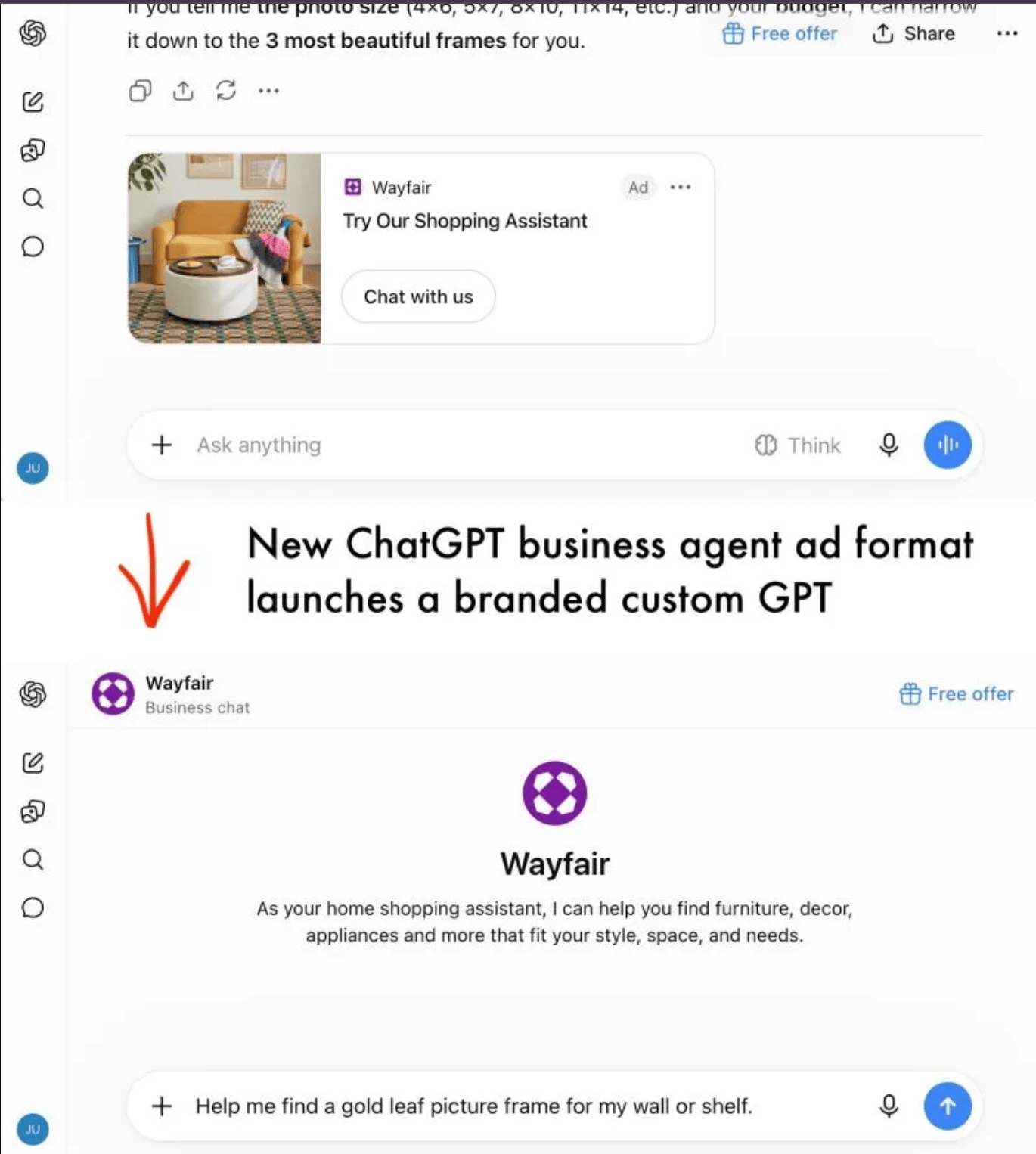
Wayfair is testing an ad that opens a branded chat. Instead of immediately sending the shopper to a website, the ad lets them ask the business more questions inside ChatGPT.
OpenAI announced Sponsored Agents as a test with select US advertisers. The sponsored conversation is separate from ChatGPT’s independent answer; the user can follow a website link when ready. Wayfair confirmed a limited pilot to Digiday.
The useful lesson for a service business: prepare the answers that come after initial interest. You can do that without access to the pilot.
Step 1: Choose one service
Start with the page that already receives inquiries. Your marketing lead handles the edits, while Sales shares real questions from recent calls and emails.
Step 2: Gather ten buying questions
Include questions about price, what affects the price, what’s included or excluded, timelines, customer fit, proof, what you need from the client, support, and how to get started. Use the buyer’s own wording wherever possible.
Step 3: Write two useful sentences for each answer
The first sentence should answer the question directly. The second can explain a condition, point to proof, or suggest the next step. If pricing varies, explain what affects it and how a quote is prepared. Ask the person delivering the service to approve every claim.
Step 4: Add the answers near the offer
Place the Q&A on the relevant service page, close to the scope and inquiry button. Check how it appears on mobile and make sure buyers have one clear way to enquire after reading.
Step 5: Review the results
Over the next two weeks, ask Sales which questions keep coming up and track inquiry volume and qualified conversations. Update any answers that are still unclear. The goal is to make things clearer for buyers, not to guarantee an improvement in AI citations or search rankings.
Find Your Growth Leak
If the page is clear but the leads still do not fit, Scale on Steroids can review the path from campaign promise to qualified B2B conversation.
Find your Growth leak >>> Scale On Steriods
🎯 NEXT STEPS
- Pick one service page and gather ten real questions.
- Approve the answers with your delivery lead.
- Publish, then review the next two weeks of inquiries.
Stay weird,
Vaibhav